Most businesses run on a pile of separate tools: a CRM, spreadsheets, email, project software, payment systems and, more and more, AI apps. When they don’t talk to each other, people end up copying data, updating records by hand and sending the same emails again and again.
Workflow automation connects these tools and takes over the repetitive work. n8n, Make and Zapier are three of the most popular platforms for it. All three automate workflows, but they differ in how much you can customise, how much technical control you get, how workflows are designed and how they’re deployed.
So which one should you choose?
Quick answer
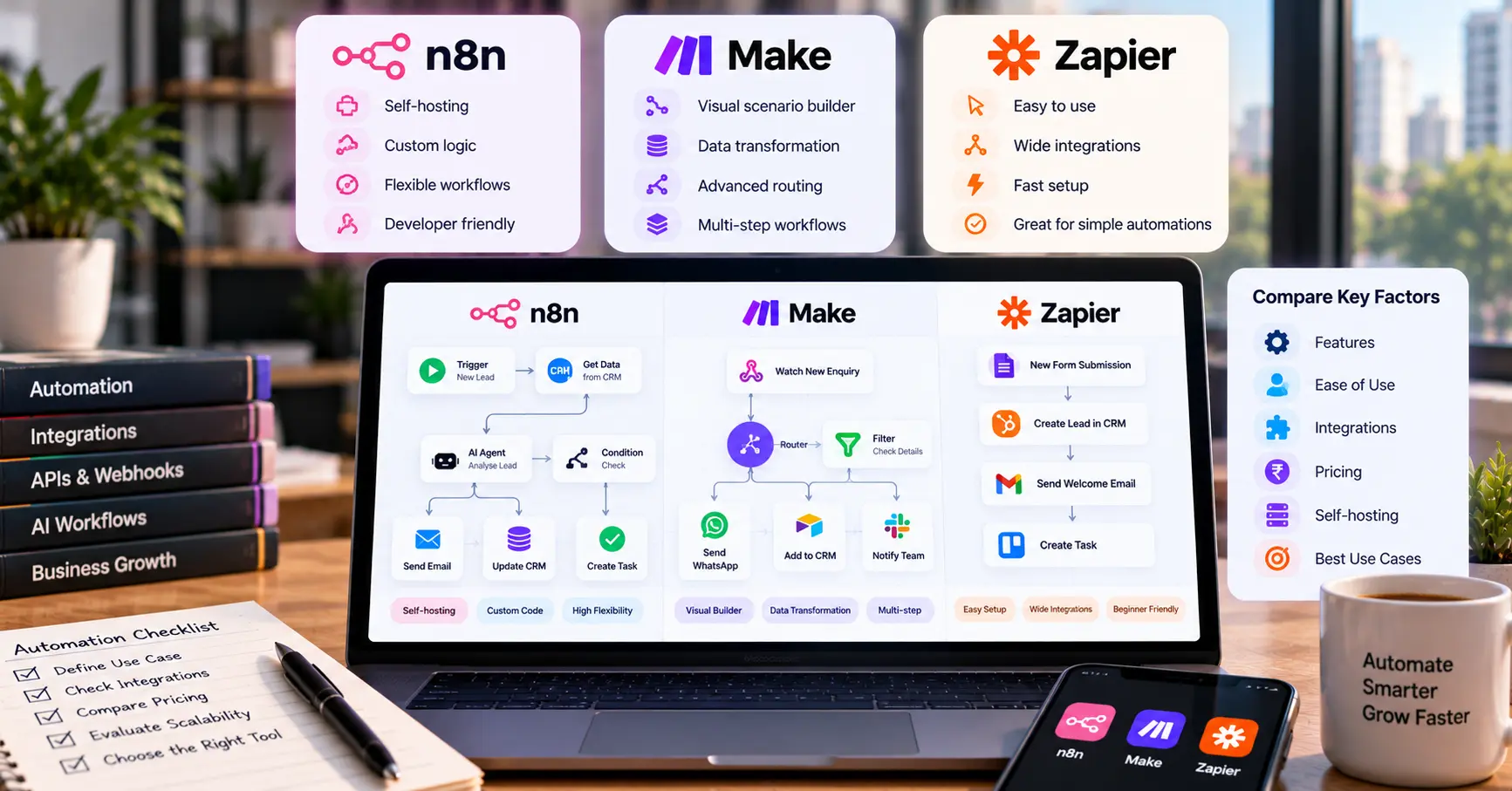
Zapier is often a good starting point for straightforward automations and for people who value an easy setup. Make suits visual workflows with several branches and data transformations. n8n appeals to technical teams that want more control, custom logic and the option to self-host.
These are starting points, not rules. The three platforms overlap a lot, and the best choice depends on your workflow, the integrations you need, your team’s skills, your security needs and the total cost of running it.
| Feature | n8n | Make | Zapier |
|---|---|---|---|
| Main approach | Visual workflows with technical flexibility | Visual scenario builder | App connections and trigger-and-action workflows |
| Ease of use | Moderate; some workflows need code | Moderate; branching takes some learning | Often beginner-friendly |
| Complex workflows | Strong for custom, multi-step logic | Strong for branching and data transformation | Multi-step workflows, with advanced features depending on plan |
| Self-hosting | Available | Primarily a hosted service | Primarily a hosted service |
| Cost drivers | Hosting, plan limits, usage, maintenance | Plan limits, operations, scenario complexity | Plan limits, task usage, premium features |
| Best starting point | Technical teams needing flexibility | Teams building visual, multi-step automations | Businesses wanting accessible app-to-app automation |
Capabilities and plan limits change, so check each platform’s official site before you decide.
What is n8n?
n8n connects applications, APIs, databases and services through configurable workflows. It has a visual editor, supports custom logic and code, and can be self-hosted, which appeals to teams that want more control over how their automations run.
Strengths:
- Flexible when built-in nodes aren’t enough, because you can add your own logic.
- Self-hosting is possible for teams with the right infrastructure and skills.
- Well suited to workflows that combine APIs, conditional branches, custom data processing and AI steps.
Limits: self-hosting brings responsibilities such as infrastructure, updates, backups, security, monitoring and recovery. Some workflows also need technical knowledge, especially when you’re debugging an API or dealing with unusual data.
Best for: developers, automation specialists and businesses that need flexible workflows or want to evaluate self-hosting.
What is Make?
Make, formerly known as Integromat, is a visual platform where you design workflows called scenarios. The visual approach makes it easy to see how data moves through a workflow, including filters, branches, transformations and conditional paths.
Strengths:
- The scenario builder helps you understand and inspect how data flows between steps.
- Flexible routing: different conditions can send information down different paths.
- Good at reformatting data from one application so another can use it.
Limits: complex scenarios become hard to maintain if they’re poorly organised, and you need to understand how your plan counts operations. Some advanced workflows need API knowledge or careful error handling.
Best for: teams that prefer visual design and need multi-step automations with data transformation and conditional routes.
What is Zapier?
Zapier connects apps and runs actions when something happens. A basic workflow, called a Zap, starts with a trigger and runs one or more actions. More advanced capabilities depend on the product and plan.
Strengths:
- Many common automations can be built without writing code.
- A broad catalogue of supported apps makes it easy to connect popular business tools.
- Non-technical teams in marketing, operations and sales can often manage basic workflows themselves.
Limits: usage-based limits and plan restrictions can push up the cost as volume grows. Workflows with complicated data processing or unusual API requirements may need more careful design or a different tool.
Best for: small businesses, sales and marketing teams and anyone who wants to automate common tasks with little technical setup.
Pricing and total cost
The cheapest platform isn’t always the cheapest to run. Pricing depends on the plan, usage limits, how the workflow is designed, hosting and how much maintenance your team can handle.
| Cost factor | n8n | Make | Zapier |
|---|---|---|---|
| Subscription | Depends on the hosted plan or deployment | Depends on plan and usage limits | Depends on plan and usage limits |
| Hosting | Extra infrastructure cost if self-hosted | Included in the hosted service | Included in the hosted service |
| Maintenance | Can be significant when self-hosted | Mainly workflow and account management | Mainly workflow and account management |
| Scaling | Infrastructure, usage and maintenance | Higher usage or plan upgrades | Higher usage or plan upgrades |
Before you choose, estimate:
- How many times the workflow will run each month.
- How many steps each run needs.
- Whether it processes large amounts of data.
- Whether paid AI APIs or other third-party services are involved.
- Whether you want a hosted platform or self-hosting.
- How much time building and maintaining workflows will take, and what happens when one fails.
A workflow that runs a few hundred times a month has very different economics from one that processes thousands of records a day. Work out expected usage using each platform’s current billing rules, and include the cost of connected services. The official pricing pages are the place to check: n8n pricing, Make pricing and Zapier pricing.
Which tool is best for AI automation?
All three can be used in AI-related workflows. The right choice depends on how much control and complexity you need.
- Choose n8n if you need custom API integrations, complex logic or data processing, want to combine AI calls with business-system actions, or want to evaluate self-hosting.
- Choose Make if you prefer a visual builder, your workflow has several conditional routes, you need to transform data between apps, and you don’t want to run your own automation server.
- Choose Zapier if you want to connect common apps quickly, your workflow is a fairly straightforward trigger and action, and the integrations you need are already supported.
Can these tools build AI agents? They can support different kinds of AI-driven workflows, but not every workflow is a fully autonomous agent. Sending text to an AI model and storing the reply is different from a system that picks tools, checks results and takes several permitted actions toward a goal. If you’re building an agent, look at tool access, error handling, permissions, human approval and monitoring, not just whether the platform advertises AI features. Our guide to AI agents vs AI chatbots covers the difference in more detail.
Which tool for which business?
| Business type | Evaluate first | Why |
|---|---|---|
| Small business with basic app connections | Zapier | Accessible starting point for common automations |
| Marketing team running campaign workflows | Zapier or Make | Depends on app coverage and complexity |
| Operations team with conditional processes | Make | Visual routing and data transformation |
| Developer building custom API workflows | n8n | Technical flexibility and custom logic |
| Business considering self-hosted automation | n8n | Offers self-hosting |
| Company building AI-enabled workflows | All three | Compare tool access, control, cost and reliability |
Treat these as starting points, and check that the tool supports the exact apps and actions your workflow needs.
A practical example: lead management
Take a company that gets enquiries from its website. A lead workflow could:
- Receive the enquiry from the website form.
- Validate the contact details.
- Work out which service was requested.
- Save the lead to the CRM.
- Notify the right person and create a follow-up task.
- Track whether the enquiry gets a reply.
A workflow tool can connect the form, CRM, notifications and task manager. AI can help classify free-text enquiries, but plain validation rules should still check the essential fields. For a simple version, a hosted platform may be enough. For a more customised setup with several APIs and specialised logic, n8n may be worth evaluating. Either way, map the workflow before you pick the tool. We walk through the process side of this in where small business leads disappear, and the property version in our post on real estate lead automation.
Common mistakes
- Choosing on subscription price alone. Compare usage limits, paid integrations, hosting, maintenance and the cost of building the workflow.
- Ignoring integration requirements. Confirm the platform supports the exact trigger and action you need, not just the app’s name.
- Overcomplicating a simple process. A short trigger-and-action workflow doesn’t need a custom server or an AI agent.
- Forgetting error handling. Plan for expired credentials, API outages, invalid data, rate limits and duplicate events, and decide how failures are logged and retried.
- Giving automations too many permissions. Use the minimum access required, protect sensitive data and require approval for high-impact actions.
- Not measuring results. Track processing time, failure rate, manual work avoided and cost per completed workflow.
Frequently Asked Questions
Is n8n better than Zapier? n8n may suit technical teams that need custom logic or self-hosting. Zapier may be more convenient for people who want common app integrations quickly. The right choice depends on the workflow, your skills, the integrations you need and the total cost.
Is Make better than Zapier? Make is particularly useful for visually designing workflows with several routes and data transformations. Zapier is often an accessible option for common trigger-and-action automations. Compare the actual workflow you need, because both platforms support more than basic automation.
Is n8n free to use? n8n offers self-hosted options and paid hosted plans. Self-hosting isn’t automatically free: infrastructure, setup, updates, backups and maintenance all take time or money. Check the current official licensing and pricing terms.
Which automation tool is best for beginners? Zapier is often a good starting point for simple app-to-app workflows, and Make is approachable for people who prefer visual design. Beginners can use n8n too, although some advanced setups need technical knowledge.
Which tool is best for AI workflow automation? There’s no single winner. n8n may appeal to developers building customised AI workflows, Make may suit visual multi-step processes, and Zapier is convenient when the AI and business integrations you need are already supported. Test your workflow and check current feature limits before you choose.
Which tool is best for a small business in India? Start with the workflow and calculate the expected cost in rupees, including taxes where they apply, AI API usage and any hosting. Choose the platform that supports your required integrations and that your team can maintain reliably.
Can I switch from Zapier to Make or n8n later? Often, yes, but you may need to rebuild workflows, reconnect apps, remap data and retest error handling. Keep documentation of your triggers, actions, credentials and dependencies so a future move is easier.
Where to start
n8n, Make and Zapier all reduce repetitive work, but their strengths differ. Choose Zapier for straightforward automations and an easy setup. Choose Make when visual workflows, branching and data transformation matter. Choose n8n when technical flexibility, custom logic or self-hosting is valuable.
Don’t pick a platform because it’s popular or because it has the lowest advertised price. Identify one repetitive process, estimate its volume, confirm the integrations and test the workflow before you expand.
InfoHQ is headquartered in Prayagraj, with operations also in Pune, and works with businesses across India. If you’d like help choosing a tool or building a workflow, see our business automation services and AI and intelligent systems services, or get in touch.