Picture two businesses that each get 100 customer enquiries a day.
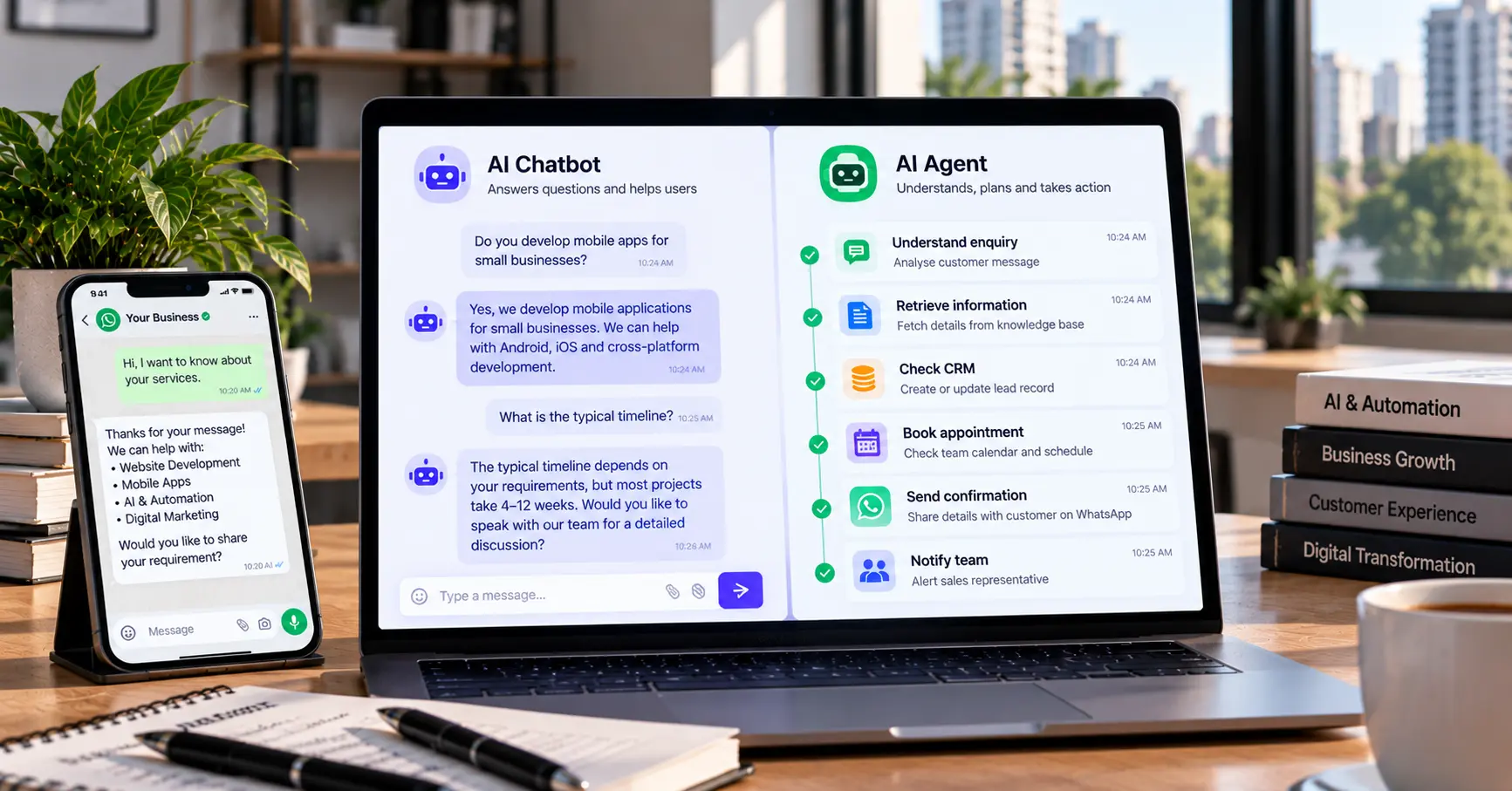
The first one uses an AI chatbot. It answers common questions, explains the services and helps people find what they need.
The second one uses an AI agent. It reads an enquiry, pulls up the relevant information, checks connected systems, updates the CRM, drafts a reply and starts an approved follow-up.
Both use AI, but they do different jobs. So which one does your business need? That depends on the tasks you want to automate, the systems you already use, how risky a mistake would be and how much independence the AI should have.
This guide explains the differences between AI agents and AI chatbots, with practical examples and a simple way to choose.
Quick answer: what is the difference?
An AI chatbot mainly talks to users. It answers questions, gives information and helps people finish conversational tasks.
An AI agent goes further. It works toward a defined goal, picks from the tools it has been given, takes actions in connected systems and adjusts its next step based on the result.
The line isn’t sharp. Modern chatbots can use tools, and agents often talk through a chat window. What matters is what a particular system can do, and what it’s allowed to do, rather than the label on the product.
| Feature | AI chatbot | AI agent |
|---|---|---|
| Main purpose | Answer questions and assist conversations | Work toward a defined goal |
| Typical workflow | Responds to user messages | Plans and carries out a sequence of steps |
| Tool use | May use a few integrations | Can use several approved tools |
| Business actions | Usually limited or predefined | Can perform permitted actions |
| Best suited for | FAQs, basic support, service information | Multi-step workflows and process automation |
| Supervision | Depends on the task | Especially important for sensitive actions |
| Implementation | Often simpler | Usually needs more integration, testing and controls |
What is an AI chatbot?
An AI chatbot is software that talks to users in natural language, on a website, WhatsApp, a mobile app or another messaging platform. It can understand questions, write replies, summarise information and keep track of a conversation. Depending on how it’s set up, it may also read from a knowledge base or connect to other systems.
A typical chatbot works like this:
- A customer asks a question.
- The chatbot interprets the message.
- It uses its model, instructions and available knowledge to form a reply.
- It sends the reply, and hands over to a person or a fixed workflow if needed.
Say a visitor asks a software company, “Do you develop mobile apps for small businesses?” The chatbot can describe the services, explain the process and point the visitor to a consultation form. That cuts down repetitive enquiries and makes basic information available outside working hours.
Chatbots are useful for:
- Customer support: answering questions about services, policies and processes.
- Lead qualification: asking visitors about their needs, budget, timeline and contact details.
- Website help: guiding people to the right service page.
- Internal knowledge: helping employees find answers in company documents. This is usually built with retrieval, which we explain in what RAG is and why it matters.
- WhatsApp conversations: supporting customers through a properly configured integration. See our guide to WhatsApp Business automation in India.
Where does a chatbot fall short? A chatbot that only writes replies may not complete the task behind the conversation. It might tell a customer a consultation can be arranged, but it can’t book one without a calendar integration and the right permissions. It might collect a lead’s details without saving them to the CRM or alerting the sales team. These gaps can be closed with integrations, but the system has to be built to do that reliably.
What is an AI agent?
An AI agent is a system built to pursue a defined goal using the information, tools and actions it has been given, within a set of instructions and permissions. Instead of only answering a question, it works out which steps a task needs, performs them, checks the result and carries on when appropriate.
How much freedom it has varies. Some agents run a short, predefined workflow. Others choose between several tools and steps.
A typical agent workflow looks like this:
- Understand the goal: work out what needs to be done.
- Gather information: retrieve what it needs from approved sources.
- Choose and run an action: pick a tool and perform a permitted operation, such as creating a CRM record.
- Check the result: see whether it worked or whether another step is needed.
- Finish or escalate: complete the task or ask a person to step in.
Take a real estate company that receives an enquiry from a buyer. A properly configured agent could:
- Pick out the preferred location and budget.
- Check approved property information and match suitable listings.
- Save the lead to the CRM and assign it to a salesperson.
- Draft a personalised follow-up and either schedule an approved reminder or ask a person to approve it first.
We look at this scenario in more detail in our post on real estate lead automation.
Agents can support more involved work, such as:
- Sales operations: researching leads from approved sources and preparing follow-up tasks.
- Customer service: retrieving order details, classifying issues and starting permitted support actions.
- Document processing: extracting information, validating fields and routing documents for review.
- Reporting: gathering data from connected systems and preparing summaries.
- Internal workflows: coordinating steps across email, CRM and project tools.
What are the limits? Agents aren’t automatically accurate, reliable or fully autonomous. They can misunderstand a request, use wrong information, pick an unsuitable action or hit a failed integration. The more tools an agent has, the bigger the effect of a mistake. That’s why permissions, validation, monitoring and human approval matter, especially for anything involving money, sensitive data, legal commitments or a big impact on a customer.
Five practical differences
1. Answering a question vs completing a task. A chatbot may explain how to ask for a quotation. An agent may collect the project details, check they’re complete, create a CRM entry and prepare the request for the sales team. If the need is communication, a chatbot fits. If it’s a multi-step task, look at an agent.
2. Fixed conversations vs flexible workflows. A basic chatbot follows a set of questions and answers. An AI-powered one is more flexible but is still built mainly for conversation. An agent can pick its next step as the task progresses, though a well-designed one still works within clear rules.
3. Limited integrations vs coordinated actions. A chatbot might answer from a website’s FAQ. An agent might pull approved information from a knowledge base, create a lead in the CRM and add a task in a project tool. Chatbots can have integrations too. The difference is whether the system can coordinate several steps toward one goal.
4. Simpler vs more complex to run. A basic FAQ chatbot can often be built with a knowledge base, clear instructions and a chat window. An agent that works across several systems needs more planning, access controls, testing, error handling and monitoring. It can automate more, but it also takes more time and money to do properly.
5. Different levels of risk. A chatbot that explains a service carries a different risk from an agent that edits customer records or starts payments. Decide which actions can happen automatically, which need approval and which the system must never do. Base this on the business process, not on how clever the model is.
Which is better for your business?
There’s no universal winner. It depends on what the system has to accomplish.
| Business need | Good starting point | Why |
|---|---|---|
| Answer common website questions | AI chatbot | Fast, consistent replies |
| Explain services and collect enquiries | AI chatbot | Handles conversation and lead capture |
| Qualify leads and save them to a CRM | Chatbot with integrations, or an agent | Depends on how complex the workflow is |
| Assign leads and manage follow-ups | Agent or workflow automation | Involves actions across systems |
| Answer from company documents | Chatbot with retrieval | Users mainly need answers |
| Process documents and update several systems | Agent with validation | Several dependent steps |
| Approvals or payments | Controlled workflow with human approval | Sensitive actions need stronger safeguards |
The most practical approach is to start with the smallest system that reliably solves the problem. A sophisticated agent isn’t automatically better than a well-built chatbot. If customers only need accurate answers to common questions, an agent just adds complexity.
Can a business use both?
Yes, and often that’s the most practical setup. The chatbot is the customer-facing part, while an agent or automation workflow does the work behind the conversation.
Picture an IT services company getting enquiries through its website chat:
- The chatbot answers basic questions about services.
- If the visitor wants a quotation, it collects the project details.
- The system checks that the required information is there.
- An agent or workflow creates the lead in the CRM and notifies the sales team.
- A follow-up message is prepared for approval, or sent under an approved policy.
- A person handles complex requirements and the commercial discussion.
In short: Customer → AI chatbot → approved tools and business rules → agent or automation workflow → CRM, calendar, email or other systems → human review when needed.
This keeps customer communication separate from operational work, which makes each part easier to manage. Not every project needs a separate chatbot and agent, though. On some platforms a single application handles both.
What do they cost?
There’s no single reliable price. Cost depends on the scope, the AI model, usage, integrations, hosting and ongoing support.
For a chatbot, the main factors are the number of conversation flows, the size and quality of the knowledge base, which channels it runs on (website, WhatsApp, app), CRM or help desk integrations, monthly volume, and maintenance. A basic FAQ chatbot is simpler than a custom one connected to several business systems.
For an agent, add the number and complexity of tasks, how many applications and APIs it connects to, data preparation and permissions, human approval steps, and the testing and monitoring needed to catch errors.
Don’t choose on the setup price alone. Ask any vendor or implementation partner to explain:
- The one-time setup or development fee.
- Recurring platform, hosting and API charges.
- Expected usage costs.
- Integration and maintenance charges.
- What happens when the AI can’t finish a task.
For an accurate estimate, define one real workflow first and ask for a quote against that scope.
How to choose: a short checklist
- Define the problem. Do you want to answer repetitive questions, capture more leads, cut manual data entry or coordinate several tasks? Write down the outcome first.
- Map the current process. Follow a request from the first message to the point where it’s done, and note the delays, handoffs and common errors.
- List the integrations you need. Website, CRM, calendar, help desk, email or messaging. Confirm the APIs and permissions exist.
- Set action boundaries. Decide what the system can do on its own and what needs approval. For example, an agent might categorise a lead automatically but need a salesperson to approve a final quotation.
- Test with real scenarios. Try normal requests, incomplete information, odd questions, failed integrations and attempts to trigger actions it shouldn’t take. Judge the outcomes, not how convincing the replies sound.
- Measure results. Track first-response time, enquiries captured, tasks completed without re-entry, how often a human has to step in, the error rate and customer satisfaction. Compare against a baseline before you expand.
Common mistakes
- Choosing an agent because it sounds advanced. Start with the simplest approach that meets the need.
- Assuming a chatbot can’t take actions. Many can connect to APIs and trigger workflows. Check what a system can actually do.
- Giving an agent unrestricted access. Use the minimum permissions required, keep read access separate from write access and require approval for high-impact actions.
- Automating a broken process. AI won’t fix unclear responsibilities or inconsistent data. Sort out the process first.
- Ignoring maintenance. Knowledge bases, APIs, policies and customer expectations change, so plan for monitoring and testing.
- Counting conversations instead of outcomes. More chats don’t mean a better business. Measure completed tasks, qualified leads and time saved.
Frequently Asked Questions
What is the main difference between an AI agent and an AI chatbot? A chatbot mainly helps users through conversation. An agent is designed to work toward a goal using available tools and actions. They overlap: a chatbot may use tools, and an agent may talk through a chat interface.
Is an AI agent better than a chatbot? Not always. Chatbots suit FAQs, customer enquiries and information retrieval. Agents are useful when a task needs several coordinated actions. The right choice depends on the complexity and risk of the workflow.
Can an AI chatbot automate business processes? Yes, if it has the right integrations and permissions. It can trigger workflows, retrieve information and create records. For more complex multi-step tasks, an agent or a dedicated automation workflow may suit better.
Can AI agents replace human employees? They can automate selected tasks, but they aren’t a replacement for human judgement. People are still needed for exceptions, sensitive decisions, accountability and customer relationships.
Are AI agents safe for business use? They can be used responsibly with the right safeguards: restricted permissions, approved data sources, input validation, logging, monitoring, testing and human approval for high-impact actions. No implementation should be assumed to be error-free.
What is the difference between an AI agent and workflow automation? Traditional workflow automation follows predefined rules and steps. An agent can use a model to interpret context and choose the next step within its limits. Many good systems combine the two, with AI for interpretation and conventional automation for predictable execution.
Should my business start with a chatbot or an AI agent? Start with a chatbot if your main need is answering questions or guiding customers. Consider an agent if your process needs coordinated actions across connected systems. If you’re unsure, map one workflow and test a small solution first.
Where to start
AI agents and AI chatbots aren’t competing technologies in every situation. A chatbot helps customers get answers faster. An agent helps your team move work forward by coordinating approved actions across systems. For many companies, the best path is a focused chatbot or automation workflow first, measure its impact, and add agent capabilities where multi-step tasks justify the extra complexity.
The goal isn’t to use the most advanced AI available. It’s to solve a real business problem reliably, securely and at a sensible cost.
If you’d like help working out the right approach, take a look at our AI and intelligent systems services and business automation services, or get in touch with the workflow you want to improve.